---
title: Session Management
description: Understand access and refresh tokens, automatic session refresh, protected API verification, cookies, and session revocation.
sidebar:
order: 10
---
## Session lifecycle summary
- Signing in creates a session and issues access and refresh tokens to the frontend.
- Protected API calls verify the access token and its expiry.
- When an access token expires, the frontend uses the refresh token to obtain new tokens and retries the original request.
- Revoking a session removes its refresh token and session information, so refresh fails and the user must log in again.
## Overview
SuperTokens provides session management out of the box.
Sessions get created when a user signs in and maintained throughout the authentication lifecycle.
In the next graphic you can see a high level overview of how the session flow works.
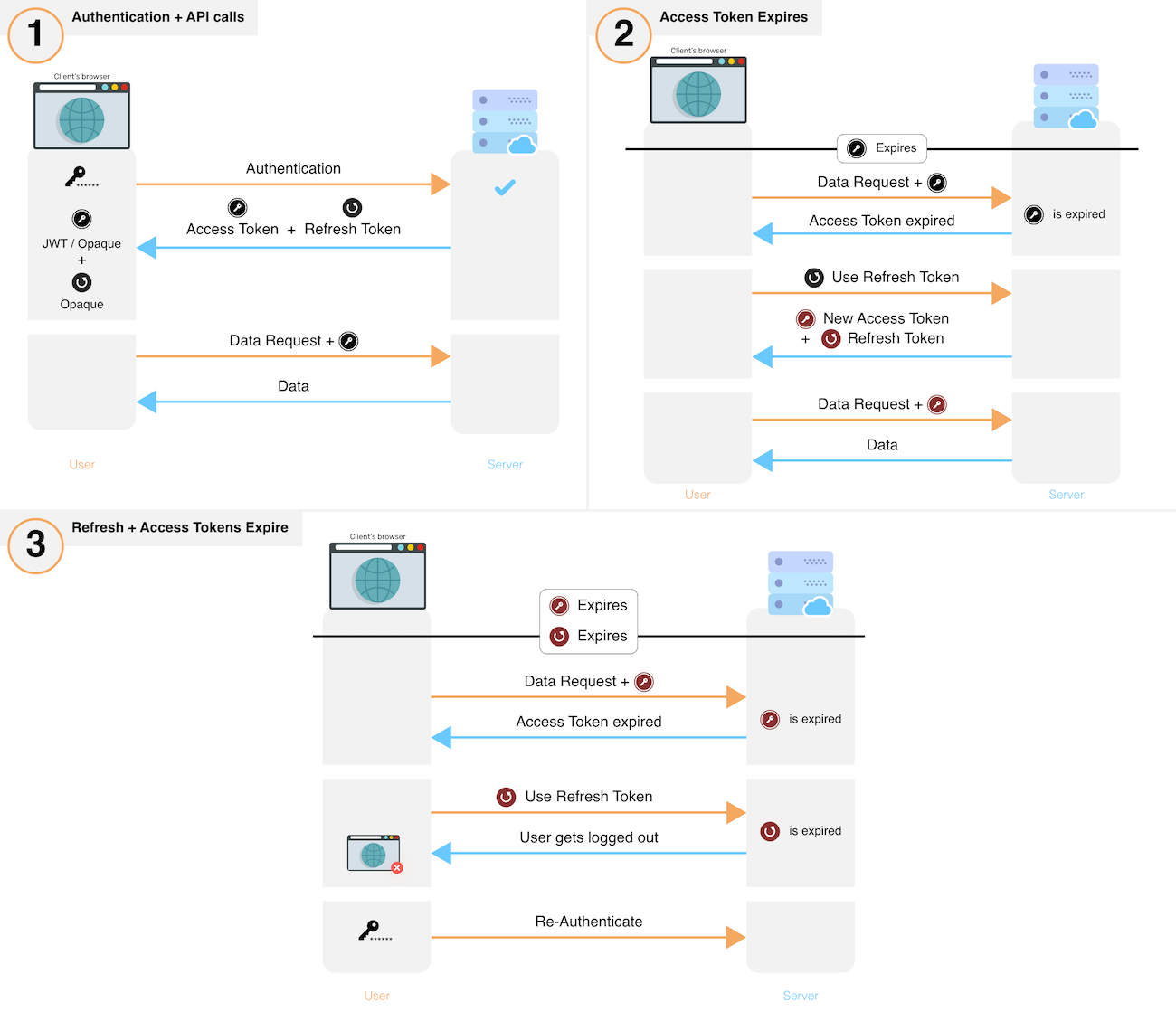 - After sign in, the system creates a new session by issuing a refresh and access token to the frontend.
- The frontend sends the access token for each API call that requires session authentication.
- These API calls verify the access token and its expiry. If verification fails, the API throws a session expired error, else, execution continues.
- If an API throws session expired error, the frontend uses its refresh token to get a new refresh and a new access token. The frontend performs this action via a special API on your backend. If you revoke a session, this API also throws session expired after which the user has to login again.
- After obtaining a new set of tokens, the frontend retries the original API call, yielding the desired result.
- To revoke a session, the backend removes the refresh token and its session information from its database.
## Information about session cookies
| Cookie Name | Description |
|-------------|-------------|
| `sAccessToken` | This is the session's access token which each API call uses to verify that the user authenticated and to get their user ID (when using cookie based authentication). |
| `sRefreshToken` | This is the session's refresh token which retrieves a new access (and refresh token) when the existing access token expires (when using cookie based authentication). |
| `sFrontToken` | Used to access a session's access token payload and user ID on the frontend without exposing the `sAccessToken`. |
| `sAntiCsrf` | Used to prevent CSRF attacks. |
| `st-last-access-token-update` | Used by the frontend to know if a session exists, and when the access token has changed. |
| `st-access-token` | Used by the frontend to store the access token for header based authentication. |
| `st-refresh-token` | Used by the frontend to store the refresh token for header based authentication. |
## Getting started
Including the `Session` recipe in the initial configuration enables sessions.
This step is outlined in all the guides that show you how to integrate different authentication methods: [Email Password](/authentication/email-password/introduction), [Passwordless](/authentication/passwordless/introduction) or [Social Login](/authentication/social/introduction).
Additionally, this section includes information on how to work with sessions after a user has signed in.
See how you can read the properties of an active session.
Learn how to revoke a session either through a user action or programmatically.
## Customization
Update the configuration to share sessions across different subdomains.
Choose how tokens are sent and stored during the authentication lifecycle.
Learn how to track session data event if a user has not logged in.
See how to act as a different user during the authentication flow.
Change the default error handling behaviour.
Use the same session management logic for multiple API endpoints.
Block access tokens from being used.
- After sign in, the system creates a new session by issuing a refresh and access token to the frontend.
- The frontend sends the access token for each API call that requires session authentication.
- These API calls verify the access token and its expiry. If verification fails, the API throws a session expired error, else, execution continues.
- If an API throws session expired error, the frontend uses its refresh token to get a new refresh and a new access token. The frontend performs this action via a special API on your backend. If you revoke a session, this API also throws session expired after which the user has to login again.
- After obtaining a new set of tokens, the frontend retries the original API call, yielding the desired result.
- To revoke a session, the backend removes the refresh token and its session information from its database.
## Information about session cookies
| Cookie Name | Description |
|-------------|-------------|
| `sAccessToken` | This is the session's access token which each API call uses to verify that the user authenticated and to get their user ID (when using cookie based authentication). |
| `sRefreshToken` | This is the session's refresh token which retrieves a new access (and refresh token) when the existing access token expires (when using cookie based authentication). |
| `sFrontToken` | Used to access a session's access token payload and user ID on the frontend without exposing the `sAccessToken`. |
| `sAntiCsrf` | Used to prevent CSRF attacks. |
| `st-last-access-token-update` | Used by the frontend to know if a session exists, and when the access token has changed. |
| `st-access-token` | Used by the frontend to store the access token for header based authentication. |
| `st-refresh-token` | Used by the frontend to store the refresh token for header based authentication. |
## Getting started
Including the `Session` recipe in the initial configuration enables sessions.
This step is outlined in all the guides that show you how to integrate different authentication methods: [Email Password](/authentication/email-password/introduction), [Passwordless](/authentication/passwordless/introduction) or [Social Login](/authentication/social/introduction).
Additionally, this section includes information on how to work with sessions after a user has signed in.
See how you can read the properties of an active session.
Learn how to revoke a session either through a user action or programmatically.
## Customization
Update the configuration to share sessions across different subdomains.
Choose how tokens are sent and stored during the authentication lifecycle.
Learn how to track session data event if a user has not logged in.
See how to act as a different user during the authentication flow.
Change the default error handling behaviour.
Use the same session management logic for multiple API endpoints.
Block access tokens from being used.