OAuth 2.0 Basics
Authenticate multiple applications using SuperTokens and OAuth 2.0 for unified login across platforms.
Overview
Each quickstart guide uses OAuth 2.0-specific concepts that you should be aware of. Read through this page to get a better understanding of the specifications.
OAuth 2.0 is an industry-standard authorization framework that enables applications to obtain limited access to a user’s resources without exposing their credentials. OpenID Connect (OIDC) adds an identity layer to OAuth 2.0.
Terminology
Roles
In OAuth, roles define the different responsibilities of entities involved in the process of granting and obtaining access to protected resources. The specification defines four roles:
Resource Owner
The Resource Owner is an entity capable of granting access to a protected resource. This is an actual person that uses an application.
Client
An OAuth 2.0 Client is an application that wants to access protected resources. It needs to get an OAuth2 Access Token from the Authorization Server. With that token the client can perform authorized operations on behalf of the Resource Owner.
The term client does not imply any particular implementation characteristics (for example, whether the application executes on a server, a desktop, or other devices).
OAuth 2.0 distinguishes between two client types:
- A confidential client runs in an environment that can protect credentials, such as an application backend. It can authenticate at the token endpoint with a client secret or another supported method. Never send its secret to a browser or native application.
- A public client runs in an environment that cannot protect credentials, such as browser JavaScript or a native application. Configure it with
tokenEndpointAuthMethod: "none"; it must not have or ship a client secret. Public clients must use the authorization code flow with Proof Key for Code Exchange (PKCE).
Resource Server
The server hosting the protected resources, capable of accepting and responding to protected resource requests using OAuth2 Access Tokens. Some real-world examples in this case would be things like:
- A file storage service that allows users to access only their files
- A social media application that allows users to access only posts from their friends
- A chat app that shows only messages from conversations in which the user is a participant
Authorization Server
The server issuing OAuth2 Access Tokens to the Client after successfully authenticating the Resource Owner.
Tokens
Tokens are strings that represent the authorization issued to the Client. They are mainly used to access protected resources on behalf of the Resource Owner. At the same time, tokens can provide more information about who the owner is.
OAuth2 Access Token
This is the main token that provides temporary access to protected resources. The OAuth2 Access Token should only be accessed and validated by the Resource Server.
OAuth2 Refresh Token
A token that allows obtaining a new OAuth2 Access Token when the current one has expired. Using the refresh token does not require the user to re-authenticate.
ID Token
This token provides identity information about the Resource Owner. Unlike OAuth2 Access Tokens, the ID Tokens should only be accessed by the Client.
Scopes
Scopes define the range of access that the Client is requesting on behalf of the Resource Owner. They specify what portions of the Resource Owner’s data the Client can access and what actions it can perform.
For example, when a user grants a web application permission to read their email, the application might request the email scope.
In a general authentication flow scopes get used in the following way:
- When the Client gets created, it configures a series of scopes for the Authorization Server.
- The Authorization Server authenticates the Resource Owner and uses the scopes to generate an OAuth2 Access Token.
- The Resource Server checks the scopes of the OAuth2 Access Token and only allows the requested actions.
Authorization flows
The OAuth 2.0 protocol defines several flows to accommodate different use cases. They are a set of steps an OAuth Client has to perform to obtain an access token.
Our implementation supports the following flow types:
Authorization Code Grant
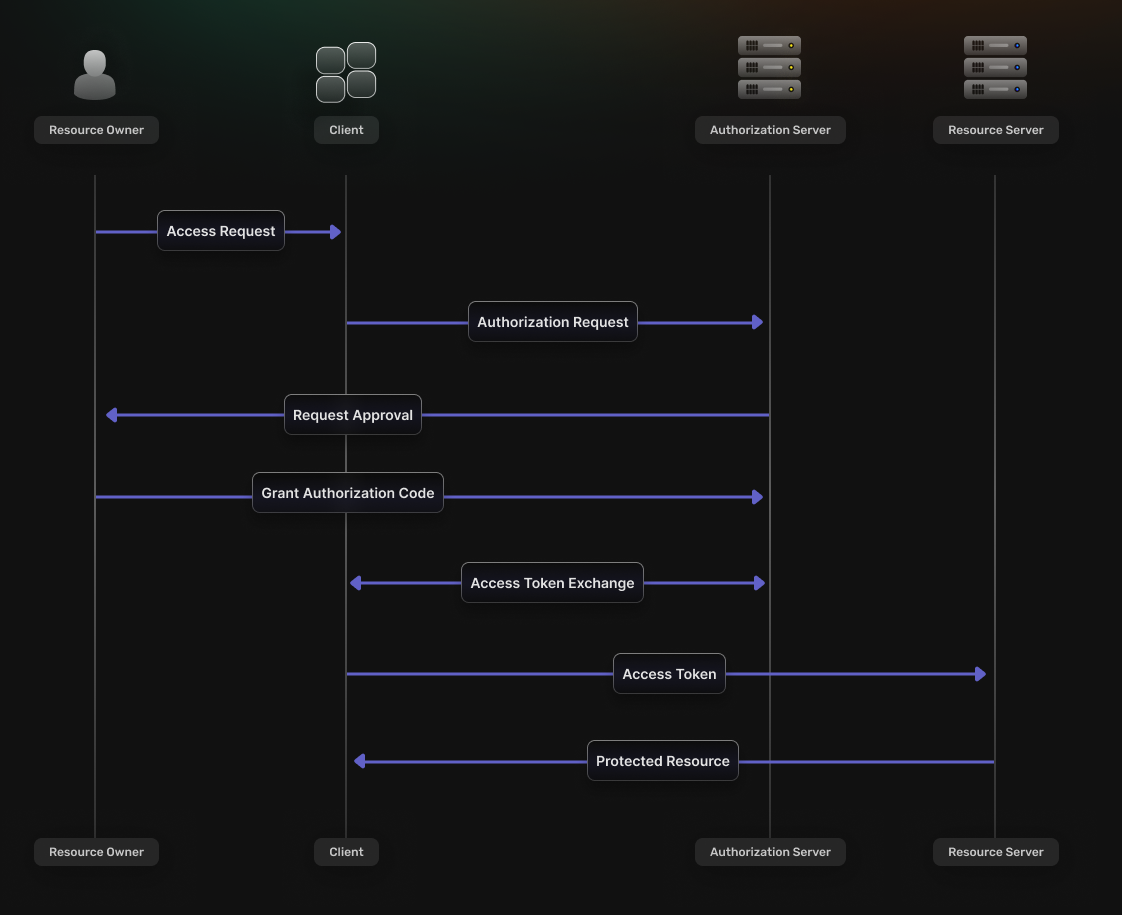
This flow is appropriate for confidential web applications and, with PKCE, public browser and native applications. It consists of the following steps:
- The Client redirects the Resource Owner to the Authorization Server’s authorization endpoint.
- If the Resource Owner grants permission, the Authorization Server redirects their browser back to the specified Redirect URI and includes an Authorization Code as a query parameter.
- The Client then sends a request to the Authorization Server’s token endpoint, including the Authorization Code. A confidential client authenticates at this endpoint; a public client supplies its PKCE code verifier instead of a client secret.
- The Authorization Server verifies the information sent by the Client and, if valid, issues an OAuth2 Access Token.
- The token can make requests to the Resource Server to access the protected resources on behalf of the Resource Owner.
Authorization code
An Authorization Code is a short-lived code that the Authorization Server provides to the Client, via a Redirect URI, after authorization approval. This code then gets exchanged for an OAuth2 Access Token. For confidential clients, the Authorization Code flow keeps tokens out of the user agent by letting the Client’s backend communicate with the Authorization Server. Public clients exchange the code directly and must use PKCE.
Proof key for code exchange (PKCE)
The Authorization Code flow uses PKCE to bind the authorization request to the token request. PKCE mitigates authorization-code interception and injection. It is mandatory for public browser and native clients and is recommended for confidential clients.
At the beginning of the authentication flow, the Client generates a random code verifier and sends its derived code challenge in the authorization request. The client must provide the original verifier during the code exchange, so an intercepted code alone is insufficient.
PKCE is not a replacement for request binding. Generate an unpredictable state, bind it to the initiating browser transaction, and verify it exactly on callback before exchanging the code. For OIDC, also generate and validate a nonce, and validate the ID token’s issuer, audience, signature, expiry, and nonce. Do not accept callback parameters that are not bound to the transaction that initiated login.
Client credentials
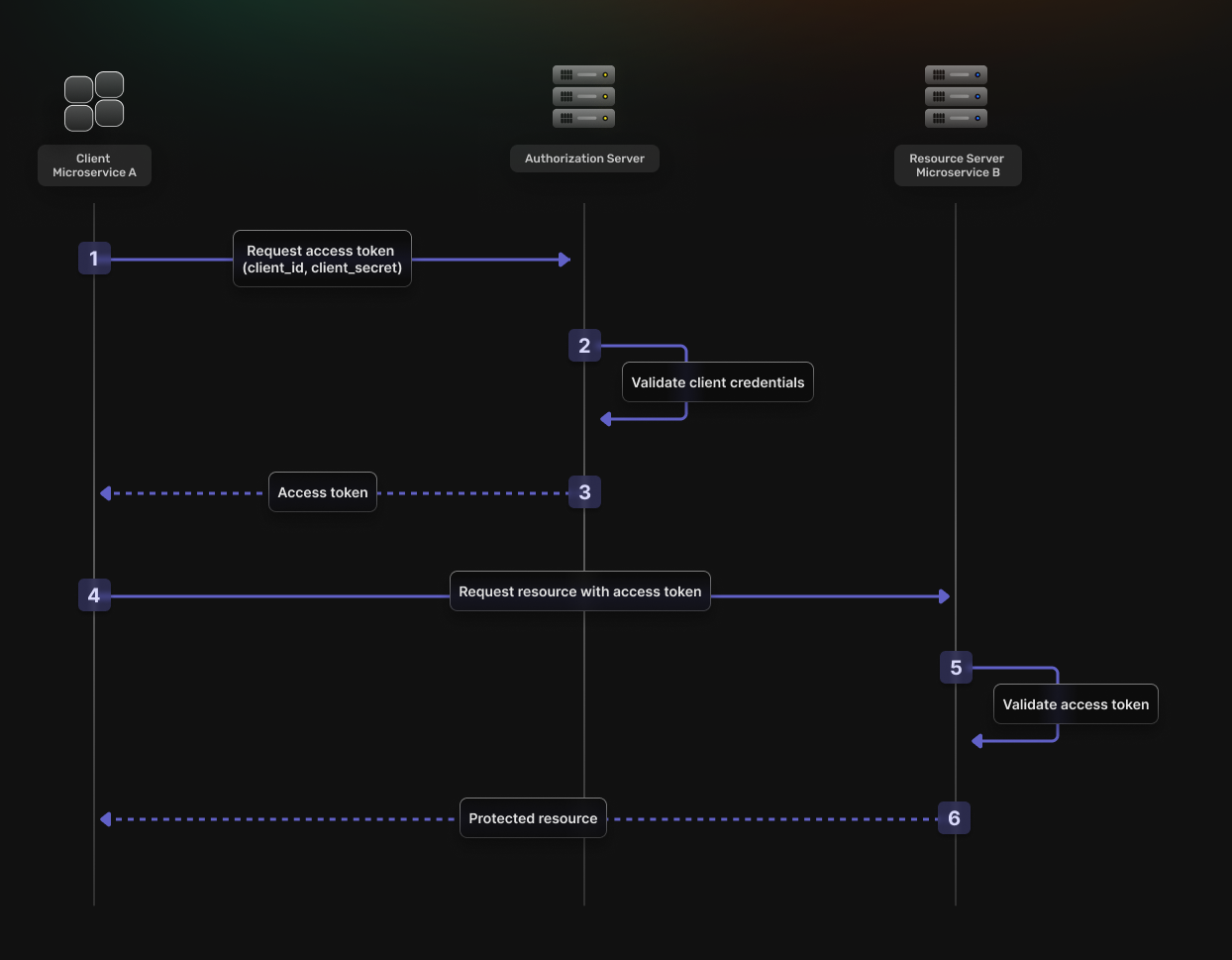
This flow is best suited for machine-to-machine (M2M) interactions where there is no end-user. It consists of the following steps:
- The Client authenticates with the Authorization Server using its own credentials.
- The Authorization Server verifies the credentials.
- The Authorization Server returns an OAuth2 Access Token.
- The Client uses the OAuth2 Access Token to access protected resources.
- The Resource Server validates the OAuth2 Access Token.
- If the validation is successful, the Resource Server returns the requested resources.